


Yucho Internet Banking Guide for Foreigners (Yucho Direct)

Japan Post Bank (ゆうちょ銀行, yucho ginko) is one of Japan's largest financial institutions, with approximately 120 million customer accounts and services available at nearly 24,000 post offices and branches nationwide as of 2025. It operates over 30,000 ATMs across Japan (one of the densest ATM networks in the country) making it accessible even in rural areas where other major banks have little or no presence.
When foreigners want to open a bank account in Japan, the number one recommended option is Japan Post Bank.
However, once you receive your standard account, you will need to sign up for one more service to access your bank account online.
This guide will quickly go over how to get a Japan Post Bank account first, then learn how to retrieve and use yucho internet banking online.
What is Yucho Internet Banking?
Yucho internet banking refers to Yucho Direct (ゆうちょダイレクト), the official online banking service provided by Japan Post Bank (ゆうちょ銀行).
Yucho Direct allows customers to access their Japan Post Bank accounts online using a computer or smartphone instead of visiting an ATM or post office.
With Yucho internet banking, you can:
Check your account balance and transaction history
Transfer money to other Japan Post Bank accounts or other banks in Japan
Pay taxes and utility bills online
Manage account settings and personal information
Lock or manage your cash card and security settings
ATM withdrawals at Japan Post Bank's own ATMs are free of charge during operating hours, including on weekends and public holidays. This is a significant advantage over most major Japanese banks, which typically charge ¥110–¥220 for ATM transactions outside business hours.
Transfers between Japan Post Bank accounts via Yucho Direct are free for the first five transactions per month, with a flat fee of ¥100 per transfer from the sixth transaction onwards.
Yucho Direct charges a flat ¥165 fee for transfers to other banks. This flat rate applies no matter how much money you send. Branch counters charge ¥660 to ¥880 for the same transfer. ATMs charge ¥220 to ¥440. Yucho Direct beats both options on price.
Fees can change without much notice. Check Japan Post Bank's official fee schedule before you rely on these numbers for a large transfer.
To use Yucho internet banking, you must first open a Japan Post Bank (Yucho) account and then register for the Yucho Direct service.
Once registered, you can access your account through:
The Yucho Direct online banking website
The Yucho Passbook App (ゆうちょ通帳アプリ)
The Yucho Authentication App (ゆうちょ認証アプリ) for secure login and transaction verification.
Yucho Direct
When you receive a regular yucho account, you can only access it through ATMs in Japan. To access your Japan Post Bank account, you will need to apply for Yucho Direct.
What is Yucho Direct?
Yucho Direct is Japan Post's online banking services. It allows you to access your Japan Post Bank account on your computer or smartphone.
This yucho internet banking service allows you to
See and make inquiries about specific accounts and transactions.
Manage domestic transfers between accounts.
Pay taxes online.
Make deposits into savings accounts.
Apply and make transactions with investment accounts.
Change and update personal details.
Manage your card, lock/unlock, and change limits.
Yucho Direct is available for all yucho account holders.
How do you make Yucho Direct?
All Japan Post Bank accounts have access to Yucho Direct. You can apply for Yucho Direct online here. You will need:
Your yucho account code
Name in katakana
Date of birth, email address
Cash card PIN
When you apply, they will send you a one-time verification code to the phone number registered to your account. If you are using the authentication app, then no code will be sent to you.
Then, you will get your login information, and you can start using Yucho Direct. Keep your Yucho Direct customer number with you, as it will be part of your login information.
How to log in to Yucho Internet Banking (Yucho Direct)
Once your Yucho Direct registration is complete, you can log in to your Japan Post Bank online banking account from a computer or smartphone.
Follow these steps to access Yucho internet banking:
Go to the Yucho Direct login page on the Japan Post Bank website.
Enter your Yucho Direct customer number.
Enter your login password.
Open the Yucho Authentication App (ゆうちょ認証アプリ) to verify your login.
After authentication, you will be redirected to your online banking dashboard.
From the dashboard, you can:
Check your account balance
View transaction history
Transfer money to other bank accounts
Pay certain taxes and services
Manage account settings
For security reasons, Japan Post Bank may require additional verification when logging in from a new device or performing large transfers.
Can you use Yucho Internet Banking outside Japan?
Yes, Yucho Direct can be accessed from outside Japan via the website or the Yucho Passbook App.
However, some security features require a Japanese phone number for SMS verification, and certain high-value transactions may require a registered device.
Foreign residents who plan to leave Japan should register the Yucho Authentication App before departing, as it enables app-based verification without needing a Japanese phone number.
International transfers now use a separate service
Yucho Direct no longer handles international transfers. Japan Post Bank ended this feature on August 31, 2025.
Branch-counter international transfers ended two days earlier, on August 29, 2025. Both changes happened the same month.
To send money abroad now, use the separate "Yucho International Money Transfer" web service. This service launched on July 8, 2025, and you don't need a Yucho Direct account to use it.
The transfer fee stays the same at ¥3,000 per transaction. Log in with your Japan Post Bank cash card details through the dedicated international transfer portal.
Yucho Direct Plus: the bankbook-free option
Yucho Direct Plus is a full bank account with no physical bankbook. All your account activity lives inside Yucho internet banking instead.
This option suits people who prefer managing everything from a smartphone or computer. It includes every online banking service that regular Yucho Direct offers.
Two ways to apply:
Already have a Japan Post Bank account? Apply for Yucho Direct first, then switch to Yucho Direct Plus.
No account yet? Apply for Yucho Direct Plus directly through the Yucho Tetsuzuki App. You skip the regular account step entirely.
Note: if you already hold a bankbook-type account, you cannot open a second Yucho Direct Plus account. Pick one path and stick with it.
Yucho Direct vs. Yucho Direct Plus
Feature |
Yucho Direct |
Yucho Direct Plus |
Physical bankbook |
Yes |
No |
Best for |
Existing account holders |
New applicants who want a fully digital account |
How to apply |
Online, after opening a standard account |
Directly through the Yucho Tetsuzuki App |
Online banking features |
Full access |
Full access |
Deposit limit |
¥13 million |
¥13 million |
Monthly fee |
None |
None |
Can switch later |
N/A |
Requires a bankbook re-issue request at a branch |
Both account types give you the same access to internet banking services. The bankbook is the only real difference.
How to open a Japan Post yucho bank account
Japan Post Bank is widely regarded as the most accessible bank in Japan for foreign residents because it has no minimum residency requirement. Major commercial banks such as MUFG, Mizuho, and SMBC typically require foreign nationals to have lived in Japan for at least six months before opening an account. Japan Post Bank allows foreigners to apply as soon as they have a valid Residence Card and a registered Japanese address. A personal seal (hanko) is not required — a signature is accepted for most procedures.
To access yucho internet banking (Yucho Direct), you will need a yucho Japan Post Bank account first.
Method 1: Apply on the Yucho Tetsuzuki App
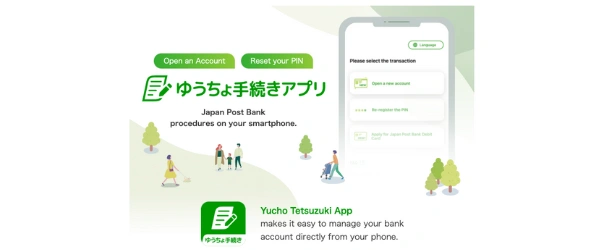
The Yucho Tetsuzuki App allows you to apply for a Japan Post Bank account within one app.
If you are having trouble finding the app, change the region of your phone to Japan.
With the Yucho Tetsuzuki App, you will need to prepare these items:
Set your phone's region to be in Japan
Residence Card or other forms of ID to verify your identity and residence status
Have your name in katakana
Dates must be in yyyy/mm/dd format
Some fields will need to be in Japanese, such as company/school name, address, and phone number
Once your application is accepted, your yucho account information, bank book, and Yucho Direct instructions will be sent to you.
For more detailed instructions, use their guide here.
Method 2: Apply at a Japan Post office
There are two ways to apply for a Japan Post Bank account at the post office.
Prepare and print the application form.
Make a reservation at your Japan Post office.
For both options, you will need documents such as your residence card, student ID, or passport, and your name in katakana. Note: a personal seal (hanko) is not required for foreigners opening a Japan Post Bank account.
Once your application is accepted, you will receive information on how to apply for Yucho Direct for any yucho internet banking purposes.
Device requirements for the Yucho Tetsuzuki App
Not every phone can open a Japan Post Bank account online. Check your device before you start.
Supported devices:
iPhone 7 or later, running iOS 13 through 15
Android phones on version 6 through 12, with NFC support
Your phone's region setting must be Japan
Why NFC matters: The app reads the IC chip inside your residence card. Your smartphone needs NFC to scan it. Older or newer phones outside these OS ranges may not work, even with NFC.
Processing timeline:
Identity verification takes about one week
Your cash card arrives by mail in about two weeks
You'll get a customer number and Yucho Direct login details in the same mailing
If your phone doesn't meet these requirements, you still have two options.
Apply at a Japan Post office instead. This path skips the app entirely, so your phone's OS and NFC support don't matter. See Method 2 above for the full steps.
Or borrow a compatible device. The app checks the phone it runs on, not who owns the account. If a friend or family member has a supported iPhone or Android device, you can complete the application on their phone instead.
Supported OS versions change over time as Japan Post Bank updates the app. Always check the current device requirements before assuming your phone won't work, especially if you tried before and it failed.
Can foreigners use Yucho Internet Banking?
Yes. Foreign residents in Japan can use Yucho internet banking (Yucho Direct) as long as they successfully open a Japan Post Bank account.
Japan Post Bank accounts have a deposit limit of ¥13 million per account. Foreign residents who need to manage amounts above this limit should consider opening accounts at additional banks. There is no monthly maintenance fee for Japan Post Bank accounts, and no minimum balance requirement, which makes it suitable for newly arrived residents who are still building their finances in Japan.
To use Yucho Direct as a foreign resident, you typically need:
A valid Residence Card
A registered Japanese address
A Japanese phone number
Your name written in katakana
Your Yucho bank account number and cash card PIN
After opening your Japan Post Bank account, you can apply for Yucho Direct online and begin using Japan Post Bank’s internet banking services.
Once registered, foreign users can:
Check account balances online
Transfer money within Japan
View transaction history
Use Yucho smartphone banking apps
Manage account security settings
Things foreigners should know
Some parts of the Yucho Direct registration process may require information in Japanese, including:
Address format
Employer or school name
Name written in katakana
Additionally, most Yucho online banking interfaces and apps are primarily in Japanese, although some setup pages and guides are available in English.
Yucho internet banking guide
Now that you have a Yucho Direct, you can access Japan Post Bank's yucho internet banking services.
Online money transfer with Yucho Direct
How to raise your daily transfer limit
Yucho Direct sets a default daily transfer limit when you first register. You can raise this limit yourself, but only up to a point.
To raise your limit through Yucho Direct:
Log in to your Yucho Direct account.
Open the registration menu and select "account information change."
Choose "daily transfer limit" and enter your new amount.
Submit the request and wait for review.
Yucho Direct caps the online increase at ¥500,000 per day. Review takes about two days to process.
To raise your limit above ¥500,000:
Visit a Japan Post branch or post office in person. Bring your passbook or cash card, your registered seal if you have one, and valid ID. Branch staff can set a higher limit than the online system allows.
New Yucho Direct accounts have a 24-hour activation period after setup. You can't make transfers during this window.
The Yucho Authentication App can process transfers up to ¥1 million per transaction. This higher limit requires a branch visit to raise your daily transfer limit above the ¥500,000 cap set through online self-service. See "How to raise your daily transfer limit" above for both options.
If the recipient's katakana name does not match the registered account name exactly, the transfer will not be processed.
To transfer money with Yucho Direct:
1. Log in to your Yucho Direct account and Click on 振込・振替 on the main menu.
2. Then click on if you are transferring to another JP Bank account or other major banks in Japan.
3. Input your receiver's bank information, such as their Japan Post code number, account number, account type, bank branch, and the amount you want to send.
4. To confirm the payment, you will verify the transfer through a one-time code that will be texted to you.
Transfer money with yucho apps
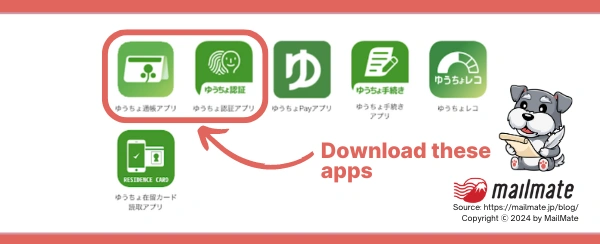
You can use certain yucho apps as a yucho internet banking method. The two main apps you will need are:
ゆうちょ通帳アプリ (yucho tsūchō apuri): to view your account and make any transfer
ゆうちょ認証アプリ (yucho ninshō apuri: to verify yourself and verify your transfer
Both are available for Apple and Android devices.
Agree to the terms and conditions in the bottom right corner when you open ゆうちょ通帳アプリ.
Enter your login information, including your bank account number, name in katakana, date of birth, and PIN code.
Register on the ゆうちょ認証アプリ with your yucho account number information. For this app, you will need to provide your ID verification, such as your driver's license, my number card, or residence card.
Open the JP Passbook app (通帳) to transfer money to another JP account or bank account.
Enter the receiver's bank account and the transfer amount. To authenticate the transfer, tap "Move App" to move to the JP verification app.
Yucho bank branch code
This article is long enough to list all the Japan Post bank branch codes.
However, we did find this visual guide to help find your Japan Post Bank code and branch name.
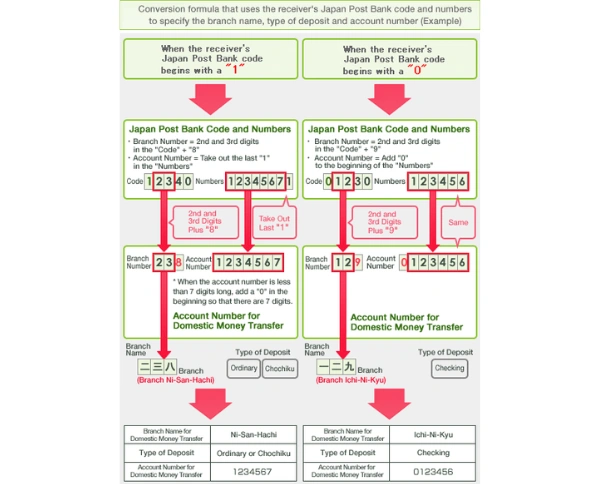
Additionally, you can find your JP bank account and 3-digit branch code on the button on the right and left corner respectively.
Does Japan Post Bank offer personal loans?
Japan Post Bank stopped offering general personal loans in June 2019. If you need cash for general use, you won't find that product here anymore.
Japan Post Bank still offers a few borrowing options, but each one works differently from a typical loan.
What's actually available:
Housing loans. Japan Post Bank offers "Yucho Flat 35" and mediates home loans from Sony Bank and SBI Shinsei Bank. These cover home purchases only, not general expenses.
Deposit-secured automatic lending. If you hold a time deposit or fixed savings account with Japan Post Bank, you can borrow against it automatically. You can access up to 90% of your deposit, capped at ¥3 million. No application or income check is required, since your own savings back the loan.
Account overdraft service. This covers shortfalls up to ¥500,000 when your account balance runs low. It requires Japanese nationality or permanent residency status, so most foreign residents on other visa types won't qualify.
If you need a general-purpose personal loan, look at Japanese banks or credit unions that offer one directly. Japan Post Bank isn't the right place for that anymore.
Important 2026 update: Yucho Pay discontinuation
Japan Post Bank has announced that Yucho Pay (ゆうちょPay), its QR code smartphone payment service, will be permanently discontinued on December 20, 2026.
Users who currently pay utility bills or shop using Yucho Pay should transition to an alternative cashless payment service before that date.
Recommended alternatives include PayPay, Rakuten Pay, and d-Barai, all of which are widely accepted across Japan. Until the termination date, Yucho Pay continues to function normally, but the points programme ended in January 2026.
Frequently asked questions
Can foreigners open a Japan Post Bank account in Japan?
Yes. Japan Post Bank (ゆうちょ銀行) is widely regarded as the most accessible bank in Japan for foreign residents. Unlike major commercial banks such as MUFG, Mizuho, and SMBC, which typically require foreign nationals to have lived in Japan for at least six months, Japan Post Bank allows foreigners to apply with a valid Residence Card (在留カード) and a registered Japanese address. A personal seal (hanko) is not required. The online account application form offers 16 languages, including English, Chinese (Simplified and Traditional), Vietnamese, Korean, Tagalog, Thai, French, Spanish, Portuguese, and Indonesian.
What is Yucho Direct and how is it different from a regular Yucho account?
A standard Japan Post Bank account can only be accessed through ATMs and post office counters. Yucho Direct (ゆうちょダイレクト) is Japan Post Bank's official online banking service, which must be applied for separately and enables account holders to check balances, transfer money, pay bills, and manage account settings from a computer or smartphone. There are two versions: Yucho Direct (for existing account holders with a passbook) and Yucho Direct Plus (ゆうちょダイレクト+), a bankbook-free digital account available to new applicants who apply online via the Yucho Tetsuzuki App. Yucho Direct is free to set up, though some transaction types carry fees.
What is Yucho Direct Plus and who should use it?
Yucho Direct Plus is a bankbook-free version of a Japan Post Bank account. It gives you full online banking services with no physical passbook to carry.
New applicants can open this account directly through the Yucho Tetsuzuki App. Existing bankbook holders can switch over after opening a standard account first.
This option works well for people who manage their bank account mostly through internet banking or a smartphone app.
Can I use the Yucho Tetsuzuki App on any phone?
No. The app requires an iPhone 7 or later on iOS 13 to 15, or an Android device on version 6 to 12 with NFC support.
Your phone needs NFC because the app scans the IC chip inside your residence card. Set your phone's region to Japan before starting the application.
If your device doesn't meet these requirements, apply in person at a Japan Post office instead.
How do I send money internationally from a Japan Post Bank account?
Yucho Direct no longer handles international transfers. Use the separate "Yucho International Money Transfer" web service instead.
This service launched in July 2025. You don't need a Yucho Direct account to use it. You do need a registered MyNumber (個人番号) to complete an international transfer.
The fee stays at ¥3,000 per transaction. Foreign residents sending money to Southeast Asia, or anyone who wants a better exchange rate, may find dedicated services like Wise or GoRemit cost less overall.
What are the transfer fees for Yucho Direct?
Transfers between Japan Post Bank accounts via Yucho Direct are free for the first five transactions per calendar month. A flat fee of ¥100 applies from the sixth transfer onwards.
Yucho Direct charges a flat ¥165 fee for transfers to other Japanese banks. This rate stays the same no matter how much money you send.
Branch counters charge more, from ¥660 to ¥880. ATMs charge ¥220 to ¥440. Yucho Direct is the cheapest way to send money to another bank.
ATM withdrawals at Japan Post Bank's own ATMs stay completely free during operating hours, including weekends and public holidays.
What is the deposit limit and are there monthly fees for a Japan Post Bank account?
Japan Post Bank accounts have a deposit limit of ¥13 million per account. There is no monthly maintenance fee and no minimum balance requirement, making it suitable for newly arrived residents who are still building their finances. For those who need to hold more than ¥13 million, opening accounts at additional banks is recommended. Japan Post Bank is regulated by the Financial Services Agency of Japan (金融庁) and deposits are protected under Japan's deposit insurance system up to ¥10 million per depositor in the event of bank failure.
Where is my Japan Post Bank account number?
Your Japan Post Bank account number consists of two parts: a five-digit store code (記号, kigō) and an eight-digit account number (番号, bangō). Both are printed on the first page of your passbook (通帳, tsūchō) and on the face of your cash card. When transferring money from another bank to your Japan Post Bank account, you will need to convert these into a standard seven-digit branch code and account number format — Japan Post Bank provides a conversion tool on its website for this purpose. Yucho Direct Plus account holders who do not have a passbook can find their account details in the Yucho Passbook App (ゆうちょ通帳アプリ).
Can I use Yucho internet banking from outside Japan?
Yes. Yucho Direct can be accessed from outside Japan via the website or the Yucho Passbook App as long as you have your login credentials and the Yucho Authentication App installed. Some security checks may require a previously registered device. Foreign residents who plan to leave Japan should install and register the Yucho Authentication App (ゆうちょ認証アプリ) before departing, as it enables app-based two-factor verification without requiring a Japanese phone number for SMS codes. Note that certain high-value transactions may still require additional verification.
How do I set up Yucho Direct?
To set up Yucho Direct, go to the Japan Post Bank website and select the online application. You will need your Yucho account code number (記号番号), your name in katakana, your date of birth, your registered email address, and your cash card PIN. During registration, you will receive a one-time verification code to authenticate your identity. If you use the Yucho Authentication App, the code is delivered through the app rather than by SMS. After setup, your account will not be fully active for 24 hours and transfers cannot be made during this period. Keep your Yucho Direct customer number safe, as it is required every time you log in.
Is Yucho Pay still available?
Yucho Pay (ゆうちょPay), Japan Post Bank's QR code smartphone payment service, has been announced for permanent discontinuation on December 20, 2026. The points programme ended in January 2026. If you currently use Yucho Pay to pay utility bills or shop in stores, you should transition to an alternative QR payment service before that date. Widely accepted alternatives in Japan include PayPay, Rakuten Pay, and d-Barai, all of which link to bank accounts and work at most convenience stores, supermarkets, and retail chains. Until December 20, 2026, Yucho Pay continues to function normally.
In closing
Yucho internet banking can be easy once you have everything set up. The first step is to open a Japan Post Bank account and then set up a Yucho Direct to manage your finances online.
Spending too long figuring out your Japanese mail?
Virtual mail + translation services start at 3800 per month. 30-day money-back guarantee.