


How To Top Up Suica Card & Other IC Cards: Plus Alternatives


Knowing how to top up your Suica card (スイカ) is one of the most practical things you can do before traveling Japan.
Suica is a prepaid IC card issued by JR East that works on trains, buses, and subways across Japan and doubles as a payment card at convenience stores and vending machines. Physical Suica cards hold a maximum balance of 20,000 yen and can be recharged at station ticket machines, convenience stores, and ATMs using cash, or via Apple Pay using a registered credit card.
The Welcome Suica card, designed for short-term visitors, is valid for 28 days from first use and carries a non-refundable balance. This guide covers every top-up method for both physical Suica cards and mobile options in 2026.
How to recharge your IC card
There are many ways to recharge your IC card. Before diving into the steps, here is a quick comparison of the most common Suica options in 2026.
Card type |
Validity |
Max balance |
Top-up methods |
Refundable |
Regular Suica (physical) |
10 years from last use |
20,000 yen |
Cash at machines, stores, ATMs |
Yes (minus 220 yen fee) |
Welcome Suica (physical) |
28 days from first use |
20,000 yen |
Cash at machines, stores, ATMs |
No |
Suica via Apple Wallet |
No fixed expiry |
20,000 yen |
Credit card via Apple Pay |
No |
Welcome Suica Mobile app |
180 days from issuance |
20,000 yen |
Credit card via Apple Pay, cash at machines |
No |
Below are the three main locations where you can top up your IC card. All these locations allow you to insert cash as the payment option.
1) At any train stations
The most common location to top up your IC card is at any train station.
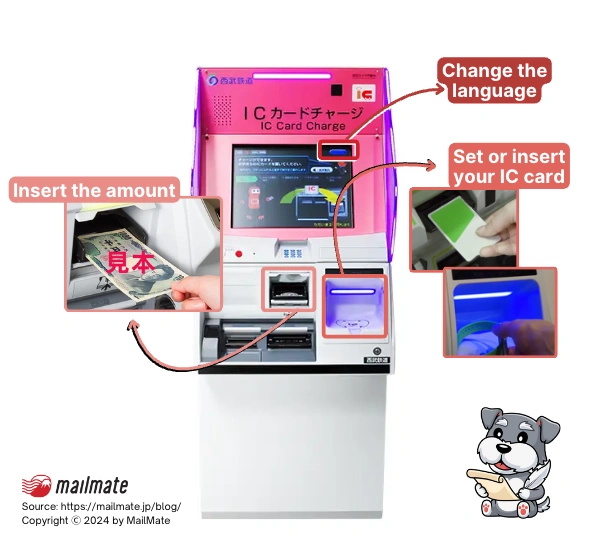
Here is a step-by-step guide to recharge your IC card:
Tap the language or English button at the top right corner.
Insert your physical Suica or the IC card in the slot.
Tap “Charge to IC Card”
Select the amount you want to charge. Top-up amounts are available in increments of 500 yen, 1,000 yen, 2,000 yen, 3,000 yen, 5,000 yen, and 10,000 yen. The maximum balance on any Suica card is 20,000 yen.
Insert cash.
Tap if you want a receipt or not.
Take your IC card and your receipt (if you choose it).
If you have the Suica card on your iPhone or any other IC card, choose an IC charge station (indicated by the purple flashing lights) to set your phone or watch on top.
Rest your device in the center and wait for the machine to recognize it. Follow the instructions on the screen to select the amount you want to top up.
2) In-store
You can top up your Suica card and other IC-compatible devices at convenience stores, supermarkets, shopping centers, electronics retailers, and other places.
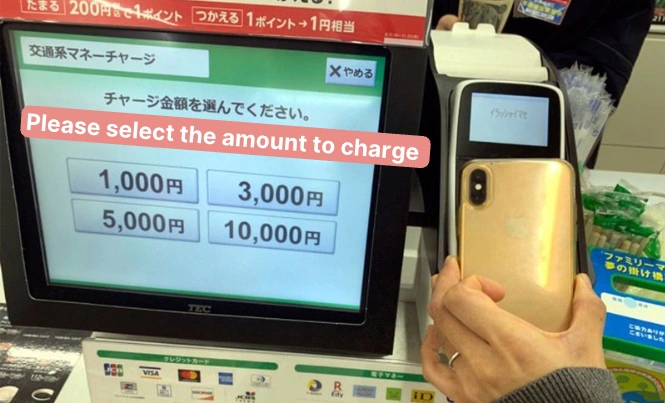
To do so, you’ll need to talk to the staff:
Tell the clerk, 「Suicaにチャージお願いします」 (Suica ni cha-ji onegaishimasu).
Place or touch your Suica card on the card reader.
Tap the amount you want to recharge on the display.
Confirm and insert the amount to pay.
For this method, payments can only be made in cash.
3) At the ATM
More recently, you can top up your IC card at conbini ATM. By far, the most popular location is at 7/11.
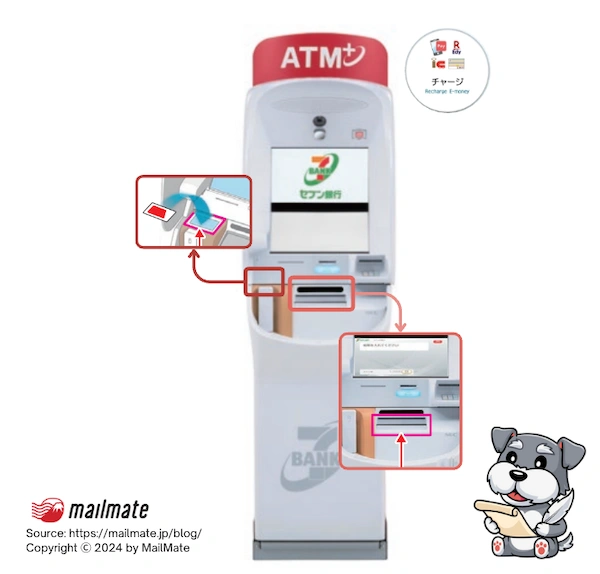
7/11 ATM has two versions, but both have relatively the same steps:
Change the language if needed.
Tap "Recharge E-Money" or「チャージ]」.
Tap the specific card you want to recharge. In this case, it is the IC Prepaid Transportation Card 「交通系電子マネー」.
Place your IC card or Phone on the reader.
Tap “Charge”「チャージ]」.
Select and insert the amount you want to charge.
Wait for everything to be processed.
Receive the change if needed.
The details of the transaction will be displayed. Select “Receipt” if you want it, or click “Confirm” without one.
Remove the card or phone from the reader.
You’ve just finished topping off your Suica card with an ATM.
How to recharge your mobile IC card
There are two ways to recharge your mobile Suica card, which depend on whether you have it through your Apple Wallet or the app and if you have a Japanese or international credit card.
1) Apple Wallet
Topping up your Suica card via Apple Wallet works with most foreign credit cards, with one important exception: foreign-issued Visa cards are blocked at the payment network level and will not process. Foreign Mastercard and American Express cards work reliably. Debit cards, regardless of network, have mixed results.
If you don’t have an IC card on your Apple Wallet, tap the “+” sign on the top right corner, tap “Transit Card,” and select ICOCA, PASMO, or Suica. You can create or transfer a new card from an existing one.
To top off your Suica on your phone:
Open the Wallet app.
Select the IC Card you want to charge.
Tap "Charge" or “Add Money.”
Enter the amount you want to charge.
Authenticate with Touch ID or Face ID.
For this method, ensure you have a Mastercard or American Express card registered in your Apple Wallet.
Foreign-issued Visa cards are blocked from topping up Suica in Apple Wallet due to a payment network restriction that affects Visa transactions specifically. This is not a temporary glitch but a structural incompatibility. If your card is a foreign Visa, use the Welcome Suica Mobile app instead, which accepts a wider range of international cards via Apple Pay.
2) Welcome Suica Mobile app (recommended for international visitors)
JR East launched the Welcome Suica Mobile app on March 6, 2025, specifically for international visitors.
The app is in English, available on iPhone and Apple Watch, and issues a digital Suica valid for 180 days from the date of issuance.
Visitors from Singapore, South Korea, Taiwan, Malaysia, Australia, and Vietnam can set up the app before arriving in Japan. All other visitors can complete setup after landing using airport Wi-Fi.
To get started:
Download the Welcome Suica Mobile app from the App Store.
Open the app and tap "Issue Suica."
Follow the on-screen instructions to set up your digital card.
Top up using a credit card registered to Apple Pay. No Japanese card is required.
The card is added to your Apple Wallet and is ready to tap at ticket gates and payment terminals.
Note: credit card top-ups via Apple Pay are unavailable daily from 2:00 a.m. to 4:00 a.m. Japan Standard Time due to system maintenance. Cash top-ups at station machines and convenience stores are not affected and work at any hour.
Since fall 2025, the app also connects to JR-EAST Train Reservation, allowing you to purchase Shinkansen e-tickets and board by tapping your iPhone or Apple Watch at the gate.
3) IC app
First, you’ll need to download the Suica app or any IC card app. Change your App Store region to Japan if needed.
Creating a Suica card
You’ll need to create a Suica card on the app. Here's how to do so:
Download and open the app.
Tap the “+” sign in the top right corner.
Scroll all the way to the right for「Suica 無記名」and tap the green button at the bottom 「発行手続き」.
The next screen is a warning about having an unregistered card means you’ll have limited support if there’s an issue. If you agree, tap the top right corner 「次へ」to go to the next page, and tap "Agree" 「同意する」.
Tap「金額お選ぶ]」and select the amount you want to add.
Press 「Payでチャージ」.
The Apple Pay icon will pop up to process. Authorize the payment. You can use an international card to complete this process.
Select where you want to add your [Suica 無記名] card, such as to your Wallet or Apple Watch.
Click “Next” at the top right corner, and “Agree” to the Terms and Conditions.
Tap “OK” when the [Suicaの発行が完了しました] pops up. This means that issuing your Suica card has been completed.
The card has now been added to your wallet.
Suica card membership registration
To recharge or top off the Suica Card with an international card, you’ll need to register as a member first through the app.
Open the Suica app
Tap [ 入金(チャージ) ].
Tap on Suicaアプリ. Note: Walletアプリから/Apple Payでチャージ will not work for international visa cards.
Tap 「会員登録」to register as a member.
Tap on「モバイルデバイスにおけるSuica利用規約」, scroll all the way down, and tap on「同意する」 when it’s green to accept the terms.
Repeat step 5 for 「東日本旅客鉄道株式会社ICカード乗車券取扱規則」.
Input an email address to receive a registration code. Tap [次へ].
Check your email and input the code.
Fill out the registration information: email address, password, surname name, first name, date of birth, gender, postal code, and phone number. Note: The phone number does not have to be a Japanese one.
Tap the「完了」and select “OK” when it pops up.
You are now a registered Suica user, and you can top up your Suica card through the app.
Topping off your Suica Card on the app
Now that you are a registered member, you can top off your Suica card.
At the home screen again, tap [ 入金(チャージ) ] at the bottom.
Select the amount you want to top up.
Click Apple Payでチャージ and follow the authorization payment prompts.
You’ll see the balance update and can top up your Suica card on your phone anytime now.
Frequently asked questions
How do I top up a Suica card in Japan?
You can top up a Suica card at ticket machines in any train station, at Seven Bank ATMs inside 7-Eleven stores, and at convenience stores including Lawson. All three locations accept cash only for physical cards. If you have a digital Suica in Apple Wallet or the Welcome Suica Mobile app, you can top up anytime using a credit card registered to Apple Pay, with no need to visit a machine.
What is the maximum balance on a Suica card?
The maximum balance you can hold on any Suica card, including physical cards and mobile versions, is 20,000 yen. Top-up increments at ticket machines are available in amounts of 500, 1,000, 2,000, 3,000, 5,000, and 10,000 yen. There is no limit on how many times you can recharge, as long as the total balance stays at or below 20,000 yen.
Can I top up a Suica card with a foreign credit card?
Yes, with conditions. Foreign Mastercard and American Express cards work reliably for topping up Suica via Apple Wallet. Foreign-issued Visa cards are blocked at the payment network level and will not process for Suica top-ups in Apple Wallet. If your card is a foreign Visa, use the Welcome Suica Mobile app, which accepts a wider range of international cards through Apple Pay.
How do I top up a Welcome Suica card?
A physical Welcome Suica card can be topped up with cash at station ticket machines, Seven Bank ATMs at 7-Eleven, and convenience stores. The Welcome Suica Mobile app, available since March 6, 2025, can be topped up using any credit card registered to Apple Pay. Remember that the physical Welcome Suica expires 28 days from first use and the remaining balance is non-refundable. The app version is valid for 180 days.
How do I add money to Suica on my iPhone?
Open the Wallet app, tap your Suica card, and tap "Add Money." Select the amount, choose a credit card from your Apple Pay wallet, and confirm with Face ID or Touch ID. The balance updates immediately. For international visitors with a foreign Visa card, use the Welcome Suica Mobile app instead, as Apple Wallet does not process foreign Visa cards for Suica top-ups.
Can I top up Suica at a convenience store?
Yes. At any 7-Eleven, Lawson, or other major convenience store in Japan, tell the clerk "Suica chaaji" (Suica charge) and place your physical card or phone on the card reader at the register. Select the top-up amount on the screen and pay in cash. This method works for physical Suica cards, Welcome Suica cards, and mobile IC cards held on a smartphone.
What is the difference between a regular Suica and a Welcome Suica?
A regular Suica costs 1,000 yen to purchase, of which 500 yen is a refundable deposit and 500 yen is starting balance. It is valid for 10 years from the last use and any remaining balance can be refunded at a JR East counter for a 220 yen handling fee. A Welcome Suica has no deposit, is valid for only 28 days from first use, and cannot be refunded. It is designed for short-term visitors who want a souvenir card without a deposit transaction on departure.
Can I use Suica to pay at stores and vending machines?
Yes. Suica works as a prepaid payment card at convenience stores, vending machines, coin lockers, taxis, and many restaurants and shops across Japan that display the Suica or IC card logo. The same balance used for train fares can be used for purchases. Accepted locations include 7-Eleven, Lawson, FamilyMart, and McDonald's, among millions of other registered merchants.
In closing
Learning how to top up your Suica card in Japan is essential whether you are visiting for a week or living here long-term. For most international visitors in 2026, the Welcome Suica Mobile app is the simplest option: it accepts foreign credit cards via Apple Pay, lasts 180 days, and works from the moment you land.
For cash-only situations, any station ticket machine, 7-Eleven ATM, or convenience store will top up your physical Suica card in under a minute. Keep in mind that foreign Visa cards do not work for Apple Pay top-ups; use Mastercard or Amex instead.
Spending too long figuring out your Japanese mail?
Virtual mail + translation services start at 3800 per month. 30-day money-back guarantee.